Revisiting FreeCAD for (N+1)th Time
Friendship Mechanical engineering is magic, especially after 3D printers became affordable.
Nowadays $200 can get you a A1 mini, which is literally an appliance.
STL comes in, physical object comes out.
We even reached the point where we have aluminum-capable desktop CNC machine! [Note: Never thought I would see an affordable-ish (5000€) CNC machining appliance in my lifetime. Yes, I’m looking at you, carvera!] I think it is safe to say that we reached a point where significant portion of people on the planet can pretty much wish anything into existence, as long as one can draft it up [Note: Well, yeah, material, geometry, and working volume of the machines permitting, and all the other constraints, but still!].
And for “draft it up” part you need a mechanical CAD package. Yeah, I also find drafting on paper therapeutic, but G-code generation afterwards sucks.
Part Where He Whines About CAD a Lot
So, there’s a few offerings.
The hobbyist choice™ seems to be ConFusion 360, with Onshape being actively advertised to hobbyists.
Both of which are also most affordable options if you don’t want to deal with limitations of a free hobbyist offering: the former will set you back around 800€ for most basic version, while the latter will make your wallet lighter by around couple thousand a year. [Note: Completely unrelated side note: do you know that among all the subscription options there’s also a free, premium, life-long Rutracker membership?]
And honestly it is not that much.
Even if you only use it for 3D printing, if you use it regularly figure spent on filament is most probably comparable to a basic Fusion subscription, and as soon as you move to classical manufacturing techniques, like machining from actual metal [Note: After consulting the elvishly inclined I learned that wood is also expensive], price of this license dwindles in front of materials and machine upkeep costs.
I have a problem with those two options. They are everything I fucking hate about software. I’m okay paying for the software. For something as painful to develop as a CAD I’m willing to pay a subscription. But then Fusion locks all of your files in their fucking cloud, while making local export and versioning not exactly hard but extremely annoying. Onshape took this concept and run with it way further: not only your files are in the cloud, but the CAD itself is in the browser! As a person who regularly finds himself working on a train going through German bum-fuck nowhere, this wouldn’t do. [Note: Hotel WiFi also often leaves a lot to be desired] So yeah, thank you for being a paying customer! What, you wanna have your files? Computer says no. Fuck you, that’s why! Of course there’s Solidworks [Note: Which the author used up to recently, mostly thanks to generosity of his educational institutions and/or employers at different points in time as well as well as Dassault’s own predatory behavior around said educational institutions.] which still saves files locally and has a non cloud based licensing options. But those options are coming with a price tag of reach-out-for-the-quote.
Now, that is where open source software usually comes to the rescue! And in our case this is FreeCAD.
The Only Opensource Option
So when choosing an opensource general-purpose mechanical CAD it’s really a no-brainer: there’s only one. [Note: What, OpenSCAD I hear you say? Let’s repeat together after Quinn: “Chamfers and fillets are what separate us from the animals.”. Joking aside, openSCAD has couple of serious limitations besides chamfers and fillets being a mess, the biggest one being inability to reference geometry. You can see the model build in OpenSCAD from a mile away: single polygon extruded over and over, carefully avoidant of attaching additional geometry to the existing one. While “CAD as code” is super useful for some fully procedurally generated designs (or for the clanker to model shit for you), as an actual general-purpose mechanical CAD openSCAD is extremely lacking. There’s also cadquery, but I didn’t play much with it.]
There’s only one problem with it: it is shit.
In a hypothetical situation where FreeCAD is my only option to do CAD, I refuse to do CAD
– Some rando on Mastodon
The good thing [Note: Though considerable portion of people nowadays thinks it’s actually a bad thing for some reason.] that things change, and, by a virtue of being a thing, so does FreeCAD.
Because of this every year or two I take it out for a spin with the hope that FreeCAD was shit.
During previous attempts FreeCAD always put up quite a fight, to the point where I even stopped trying.
But last year it finally crossed the line of v1.0, which should mean something.
Then v1.1 came along with a great deal of very positive buzz online.
So I reluctantly decided to try and find the definition of insanity give it another go.
Testing out, Again
We are LARP’ing as engineers [Note: While my employment and most of my side projects are have to do with heavy-to-industrial amounts of engineering, yours truly was only formally trained as academic scientist.] today! Which means first thing to do is define constraints and requirements!
So, today [Note: “Today” being a rhetoric device. This happened over several several sittings which were spread over several days. Those who follow me on mastodon had the privelege of watching me having this traumatic experience live.], we try to model something relatively simple so we can see if it is already possible to draft something up in FreeCAD without ripping out your pubic hair in the process. If we succeed there, then we can draft up something useful and variable-driven. The choice for those two things:
- One-off warmup: the rugged box that’s all over printables, you know the one.
- Useful and parametric: Simple box for my organizational efforts
As you can see the choice of things to model was heavily influenced by me mulling over the new organization system for small bits and bobs that I need. First one we do not lay any proper requirements on - this is just a pure modeling exercise, where we try to copy the shape of the Fusion model [Note: Funny part: there’s a couple of FreeCAD clones, but they also avoid certain geometry there, as if it gonna break or something 🤔]. Main idea just to test the waters.
The second box thing I actually need. And I need a shitload of sizes and inner-space configurations. So this one we approach as a serious design. First the requirements:
- Optimized for quick and easy printing
- No external tools/hardware needed
- Overall size driven via variables/spreadsheet
- Clearance between rails is driven via variable
- The length of the rail is driven via variable
- Closure elements are automatically adjusted to overall size
- Flat bottom surface and vertical walls without a chamfer for ease of sketching/extruding the inner structure if needed
- No headspace in the lid to make filler modeling simpler
In the end I converged on a design of a box with flat lid that slides out to the side. The lid is retained by a triangular “rail” that runs along 3 edges of the box. The retaining “bump” is on the bottom of the lid that engages with the wall of the box. Rails stop on a parametric offset from this side of the box, so rail tolerance together with lid flexion can allow for this retaining bump disengagement. [Note: I would have provided early sketches here, but I lost the random piece of paper I did it on 🤦♂️.]
At last, a note on what we’ll use as a benchmark for CAD itself: I’ll be using Fusion. The reasons are: it seems to be “the default” among hobbyist/OSHW folk, and it is also the cheapest. Another important point: I have roughly as much experience working in Fusion as in FreeCAD, so the comparison is not tainted by the familiarity.
Warmup Box
This is where we get pleasantly surprised. Nothing crashed. Sketches attached where they supposed to be attached. Name of operations are still special [Note: Not in a cute way, but in a looney bin kinda way], but all of them worked. “Pad” does what normal people call “additive extrude”, button labeled “pipe” is preforming an additive swipe, etc. [Note: I refuse to use this idiotic names for the rest of this blog, and gonna use the names people coming from other CAD’s can actually understand. Also, dear FreeCAD developer, IMHO this is the easiest way to improve UX for people coming from a commercial package: fix the naming to industry standard.] This is a big upgrade from situation where software crashes randomly! in a couple of hours we have a perfectly serviceable bottom part modeled:
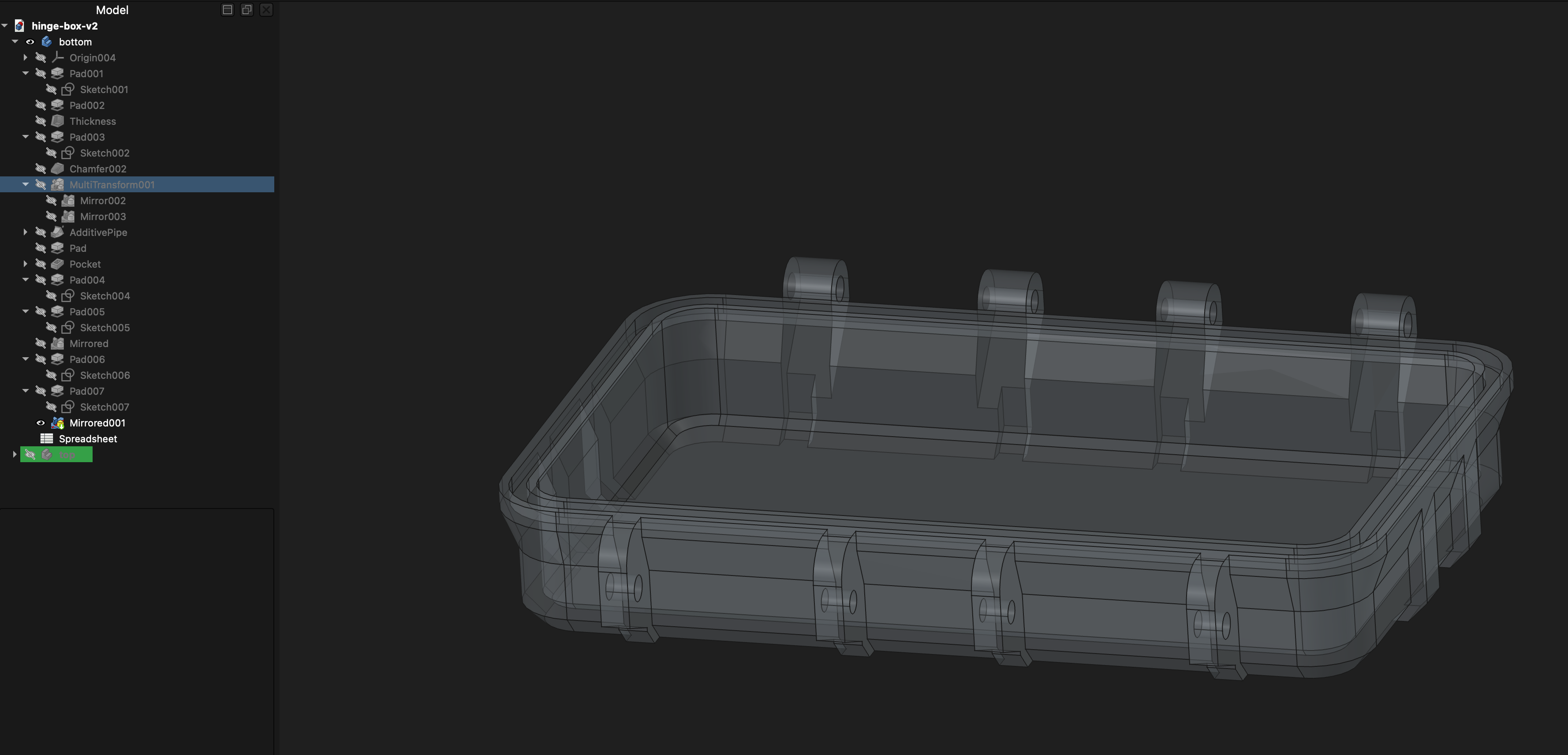
The top part is pretty much the same operations with the same order, with hinge being referenced from bottom part via subshape binder.
This is the part where I’m genuinely and pleasantly surprised. FreeCAD has officially reached works on my machine™ status for one-off models, congratulations to the team!
But how did it feel you ask? Let’s discuss UX later…
Variable Driven Simple but Useful Box
AKA the part where first positive impression falls apart as a wet cake. But I got ahead of myself. Let’s start at the end. Here’s the result:
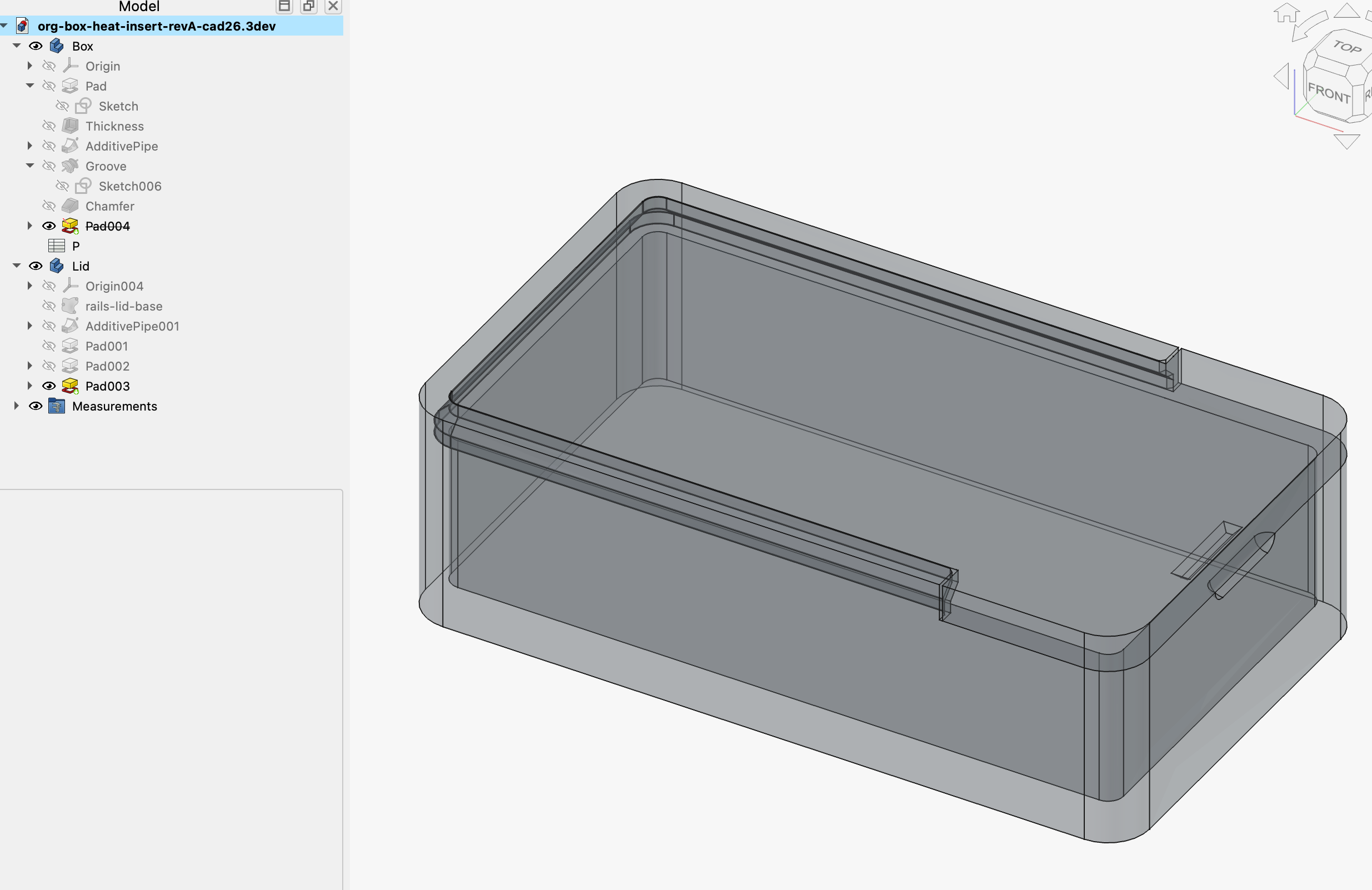
So yeah, quite spartan, but that’s the point — form follows function. Vertical edges are heavily filleted so the printer doesn’t have to jerk much.
Wall thickness is ajustable to nozzle side, so you can trade-off your print speed to strength.
The slides are swipe along path.
Slide entrance is lightly chamfered for ease of insertion. [Note: beavis-and-butt-head.mp4]
Slide clearance is a dimension between the lid sketch and subshape binder [Note: Which will constantly break later] of the base box.
Small bump [Note: Which will constantly break later] on the underside retains the lid, and flexebility of the lid together with a slide tolerance allows it to disengage, with a small groove [Note: Which will constantly break later] on the base box giving your finger some purchase.
Modelling it was okay. There was a small struggle with a datum plane to place the sketch at an offset for the slide sweep: the expression editor refused to update the value, and then the value and what displayed in the viewport got out of sync, but after couple of minutes of random clicking and moving the tip around it fixed itself [Note: There should be a button that does it for you. Not only in FreeCAD but in every CAD]. No serious technical problems yet!
But now, after couple of test prints to verify all the tolerances, it is time to put all the variables in the spreadsheet for this thing. And oooh boi….
Well, putting measurements/formulas into spreadsheet and referencing them in the model was not a problem, as long as we don’t think about amount of clicks that was required. But as soon as you try to adjust the dimensions all hell breaks loose.
Philosophical Implications of Fully Constrained Sketch
When a CAD tells you that sketch is fully constrained you’d imagine it cannot change. It might fall off due to topological renaming problem, which is bane of all parametric CADs. But not in FreeCAD, in FreeCAD “fully constrained” sketches are breaking creatively.
Let me explain. I go and change the width of the box via base sketch. Half-a-dozen operations later, there’s a sketch on a face that is revolved into the groove. And it does some circle acrobatics:
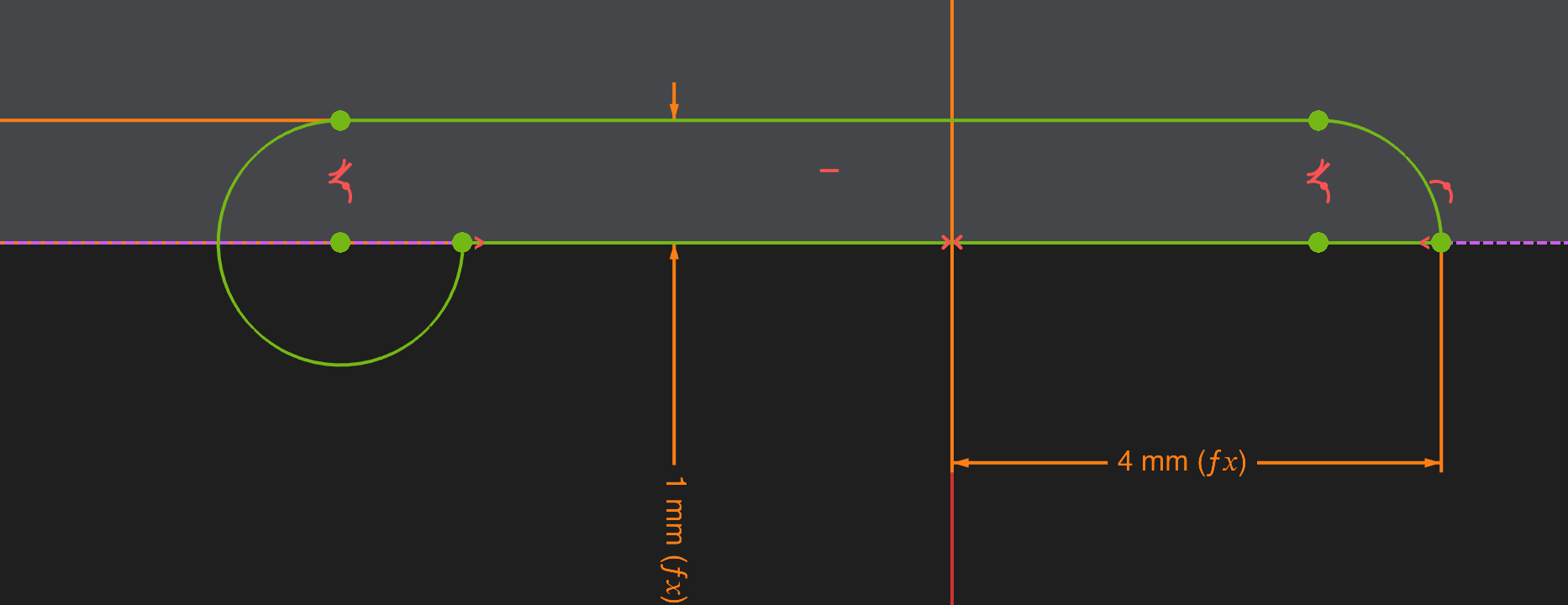
It still statisfies all the constraints, yes, but that’s not okay. Let’s say it is just a small glitch, stuff breaks sometimes. We redraw the sketch, and as soon as we hit “exit sketch” button model recalculates and now the subshape binder between the box and the lid breaks! One of the edges there decided to undergo mitosis:

The picture shows already fixed sketch, but this tiny fucker comes and goes seemingly at random. Took some pixel hunting to find the reason for this “wire open” error… But yeah, easy fix, just remove broken projected edge, project two new ones. Are we done? Well, computer says no. Now the retention bump decided that it doesn’t want to stay in the box, deciding that the direction of the offset is not important.
So I wouldn’t call this model variable-driven. The only thing that driven by variables is breakage.
At this point, as last ditch effort, I decided to try the dev build. I’ve seen in a talk that they already have merged some fixes for this “sketch jumps around”, and there’s more improvement to topo renaming in the pipeline.
There is a weekly dev build on the github, but since it looks like we need to pull random branches to have a fix for some of the problems I also decided to see how easy it is to build. Here’s another pleasant surprise: FreeCAD now uses pixi for building.
This was a breeze, and I will be exploring how useful this tool for my other projects, but I digress.
After building the dev version, and giving it some styling improvements so I don’t confuse it with release:
I made a copy of a model, clicked through “this will update your files” dialog and went on my merry way.
The only thing that was actually fixed is the broken arc. Other things are still happening, though it feels like now it happens a bit rarer. As additional annoyance change in the spreadsheet doesn’t recompute the model, and FreeCAD thinks that model is still up-to-date. I need to open base sketch and hit cmd-R there for sizes to update, after which I can leave the sketch and see which breakage I need to deal with.
I would say that dev build is in general a more pleasant experience then the v1.1 release.
And to answer the original question “How good is FreeCAD nowadays?” the answer is still shit.
Bitter Aftertaste of the UX
I deliberately talked mostly about bugs, and not about more subtle UX bits, because there FreeCAD is still light years behind. I would agree to UX downgrade in a heartbeat, provided I get a working CAD. But I think it is still valuable to write down my impressions.
I think the litmus test is: I think it took me roughly the same amount of time to model same thing in Fusion as it took me to do initial fix of broken part in FreeCAD. Please mind that I don’t use Fusion. [Note: Though judging by how smoothly it went I might as well start] I went through the same process: modeled the general shape, parameterized it [Note: Honestly best variable experience I ever had: just make any measurement a named parameter retroactively! No spreadshits, varsets or other garbage, everything is a variable already, just give it a descriptive name], started changing parameters. Nothing breaks. Specifically pushing parameters where some surface will break - error. Change number back - part recomputed as nothing happened.
And then we come to tools. As one of the examples: in Fusion there’s a button to create a plane perpendicular to currently selected path. Anyone who had any experience with CAD will say “duh! Of course there is! 90% of swipe [Note: Or what they call “additive pipe” in freecadland] operations need a construction plane attached to the end of the path to sketch upon!”. Well, when you FreeCAD you need to create a datum plane and then screw around with attachment editor to get it where you want it. While it feels like a tiny papercut, there is quite a lot of them. [Note: Another one I must mention is the sketcher color scheme. Often it is hard to tell stuff apart] If you what my honest opinion: FreeCAD branched v1 couple of years too soon…
Ending on a positive note
Most important thing is happened though. This bugs and UX are now have working groups focusing on them. New release model has one release per year that is supposed to focus on bugfixes. User experience seems to be considered a systematic problem to be dealt with, and not a nice-to-have. There are actual developer structures [Note: Like those working groups] to actually attack this systematically. And compared to v0 some simple stuff can be made in FreeCAD relatively painlessly. Even though this “revisit” post turned up to be a 90% heavy criticism kinda deal, I think that FreeCAD will find it’s way into my workflow from now on. To put it in a deliberately cringe way [Note: As cringe as the current FreeCAD user experience!🥁😬🤡]: FreeCAD is in’s KiCad v5 era. Not quite exactly unusable, and moving in the right direction. I hope that in a year or two this post will be fully irrelevant.